Linux administration · access control
A department-isolated file server, from Unix groups to Samba
Four departments, seven employee accounts, and one simple rule: each team sees only its own files. I built it with Unix groups and ACLs, automated it with a Bash script that can safely be run again, shared it over the network with Samba, and tested every access with real employee accounts.
- Period
- August 2026
- Status
- Completed · personal project, during my internship
- Type
- Personal project
The project
A personal project I did on my own during my internship period: a file server for « TechCorp », a fictional company with HR, IT, Finance and Management, built in a Docker container. Each department had to reach its own documents and a shared space, and nothing else, including over the network. I also wanted a setup that could safely be run again: typing the same commands for each department by hand had already led me to make mistakes.
- One Unix group and one folder per department, mode 770 with the SGID bit, plus a common folder reached through a shared secondary group.
- POSIX ACLs on the parent folder grant each department the traverse right (x) only.
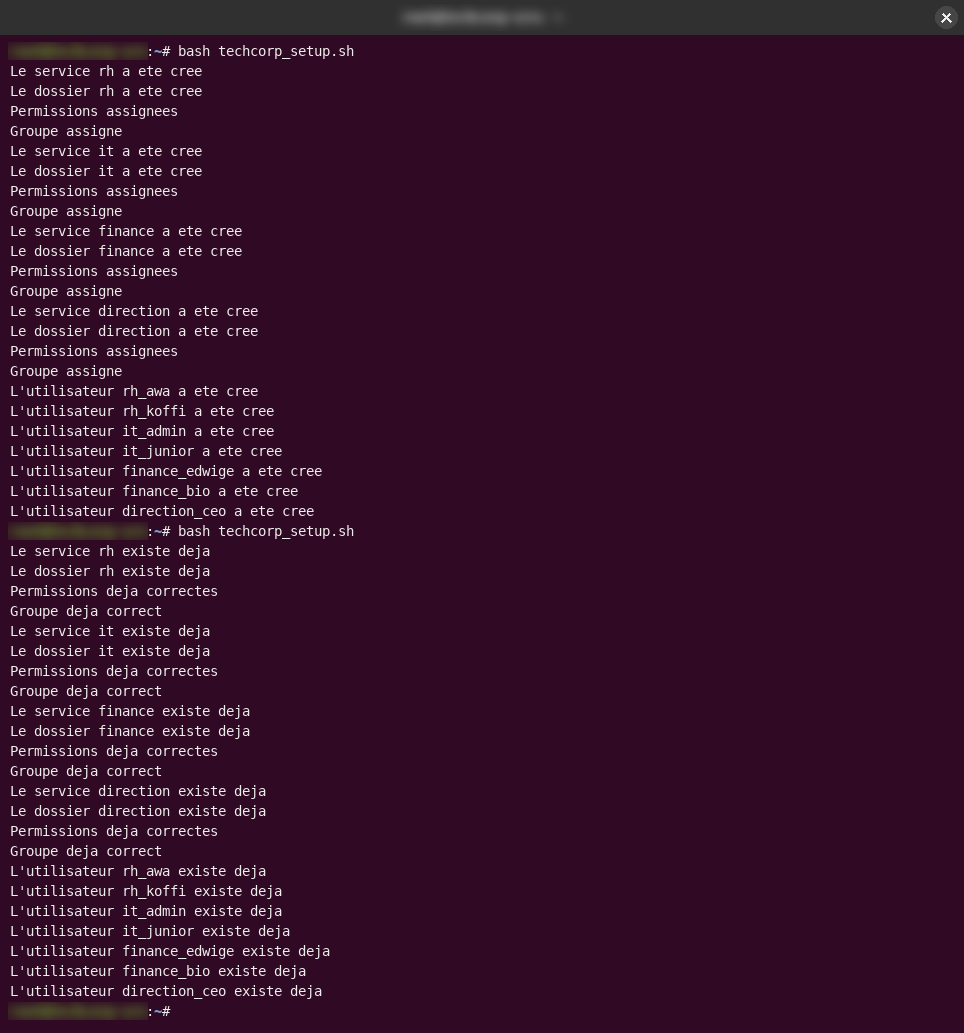
- An idempotent Bash script with three functions (create service, create users, set up folders) that checks the current state before acting.
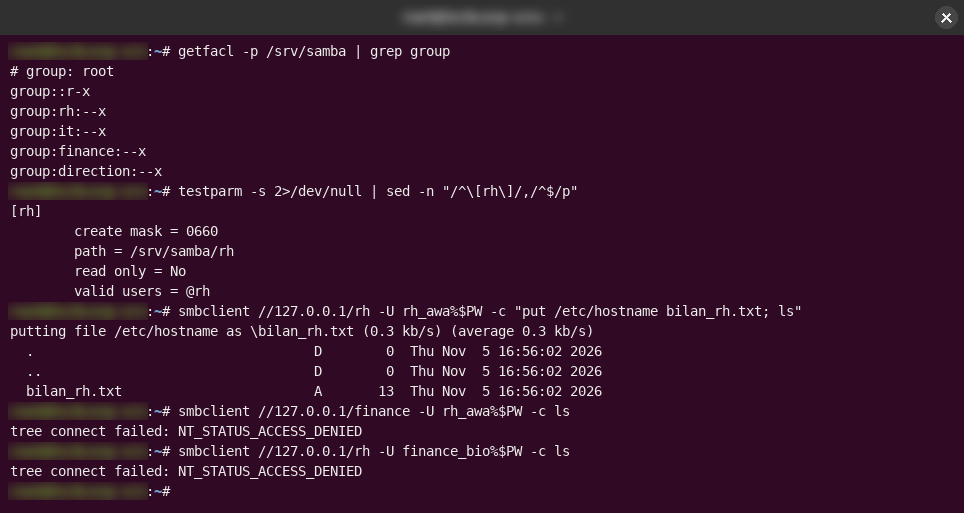
- Samba shares under /srv (per the Filesystem Hierarchy Standard), one per group: valid users = @group, create mask 0660, configuration validated with testparm.
What I did, and what went wrong
- Built the model by hand first, then replaced the repetition with a script. Employee entries are stored as user:group and split with Bash parameter expansion, without calling external commands.
- Fixed real scripting bugs along the way: a test that executed a variable instead of evaluating it; useradd failing silently while the script printed « created » (fixed by checking the exit code); comparing a name against the whole getent line instead of its first field.
- Opened the setup to the network with Samba: a system account and a separate Samba account per employee, created in a loop.
- Tested everything with each employee's real account, never as root.
What went wrong
- A correctly configured user was still denied access to their own folder. The cause was the parent folder: reaching a file requires the traverse right on every directory of the path. A folder has only one owning group, and « chmod o+x » would have opened traversal to every account on the system, which breaks least privilege. POSIX ACLs (setfacl -m g:<group>:x) solved it without changing the owner.
- SGID sets the group of a new file; whether the group can write to it depends on the umask. With the default umask 0022, new files were -rw-r--r--. A working team folder needs both settings, and umask persistence needs a profile file or default ACLs.
How I checked it
What I wanted to prove, the test I ran, and what I actually saw.
| What I wanted to prove | The test | What I saw |
|---|---|---|
| The script is idempotent | Ran it, then ran it again unchanged | Second run only reports « already exists », with no error or duplicate |
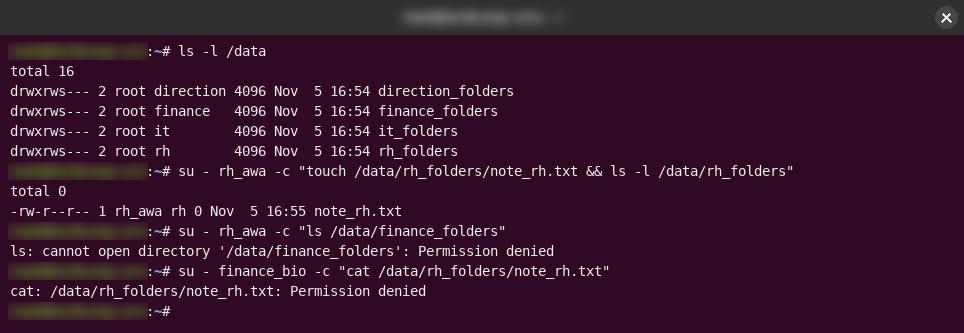
| Departments are isolated on disk | ls and cd tested separately into another department's folder, with a real employee account | Denied across departments · allowed within a department and on the common folder |
| The isolation still holds over the network | smbclient as an HR employee: own share, then another department's share | Write confirmed on HR · NT_STATUS_ACCESS_DENIED elsewhere |
| New files are not group-writable by default | An HR employee creates a file in the HR folder | -rw-r--r--: the group can read but not write (umask 022), the pitfall described below |
Result
- A file server where every allowed access works and every forbidden access fails exactly where it should, locally and over SMB.
- A reusable, idempotent provisioning script, and a written explanation of each permission choice.
Limits and next steps
- It's a lab in a container with fictional accounts.
- Identities are local; there is no central directory (LDAP or Active Directory).
- In the repository, the Samba part gathers commands I first ran and checked one by one by hand. The README says so.
What I would do next
- Default ACLs so group write no longer depends on each user's umask
- Central identities with Samba AD or LDAP
- Audit logging of share access
Code and documents
- Repository: script, Samba configuration, reports github.com/AGRO-Rachidi/linux-permissions-multiservice