Linux & systems security
Securing a Linux server in seven days
A personal project I set myself during my internship: take a fresh Ubuntu server meant for a fictional company's accounting team and secure it over a week. Key-only SSH, a default-deny firewall, encrypted backups that I actually restored, and a web service that restarts on its own, each checked with a test.
- Period
- Aug 25 – 31, 2026 · 7 days
- Status
- Completed · personal project, during my internship
- Type
- Personal project
The project
I wrote myself a seven-day scenario, which I called « Excellence Cyber »: a junior sysadmin takes over a fictional company's accounting server, freshly installed and with no protection at all. The spec covered access, data separation, backups, availability and traceability, with at most 24 hours of lost data (RPO) and 30 minutes to restore (RTO). I did it alone, during my internship period, in a Docker container, and closed the week with a self-audit of every requirement.
- One Ubuntu 24.04 server in a Docker container, on its own isolated Docker network with a fixed address.
- Three named accounts: two administrators with sudo, one service account with no interactive shell. Each has its own ed25519 key pair protected by a passphrase.
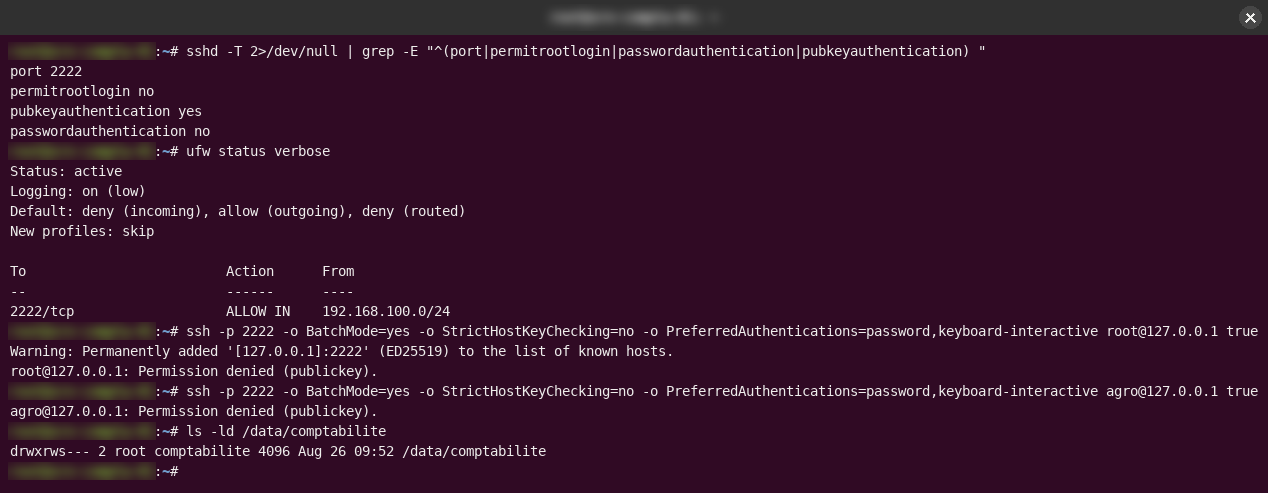
- SSH on a non-default port, root login and password authentication disabled; UFW denies all incoming traffic except SSH from the administration subnet.
- A nightly job compresses the accounting data, encrypts it with GPG (AES-256), deletes the clear archive and keeps seven days of history.
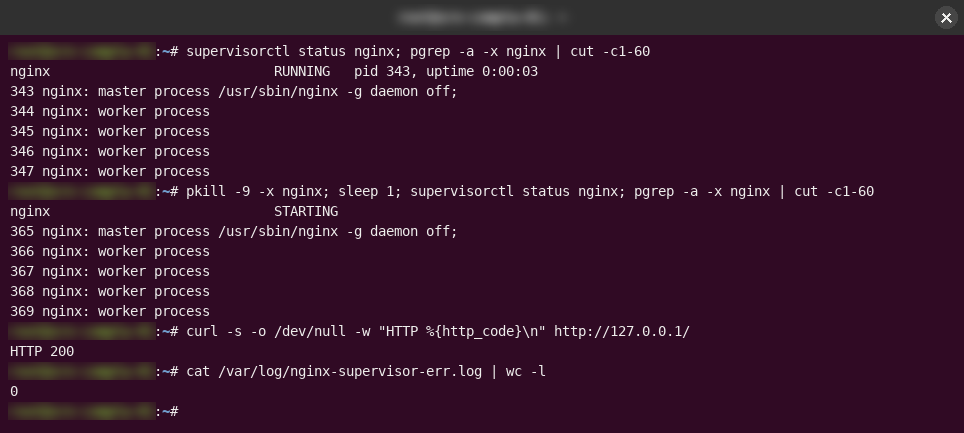
- Nginx supervised by supervisord; connection history available through last and lastlog.
What I did, and what went wrong
- Day 1: isolated network, named accounts, key-only SSH and firewall. Public keys were copied in with docker cp, because password authentication stayed disabled from the start.
- Days 2–3: dedicated accounting folder with the SGID bit; encrypted backup script with seven-day rotation, then a full restore test.
- Days 4–5: automatic restart of the web service, and connection traceability.
- Day 6: an unannounced incident, fictional like the rest of the scenario (a fictional customer claims to have received an invoice they never ordered), investigated without knowing the answer.
- Day 7: self-audit of every requirement and a mission report.
- The repository contains the scripts rebuilt from the report: onboard_user.sh (accounts), backup.sh (encrypted backup with rotation) and check-disk.sh (disk space and web service check).
What went wrong
- UFW would not start: a standard container lacks the kernel capabilities it needs. I froze the work with docker commit and recreated the container with NET_ADMIN and NET_RAW, without losing anything.
- No systemd or journald inside the container, so the usual tools for automatic restart and logs were missing. I used supervisord for the service and last/lastlog for connection history, which work without systemd.
How I checked it
What I wanted to prove, the test I ran, and what I actually saw.
| What I wanted to prove | The test | What I saw |
|---|---|---|
| Root cannot log in over SSH | Attempted a root login | Refused |
| Keys only, no passwords | Key login, then password login | Key accepted · password refused |
| Backups can be restored within the RTO | Restored the latest encrypted archive into a separate folder and compared it file by file with diff | No difference between the restored copy and the live data |
| The web service heals itself | Killed the Nginx processes with kill -9 | Restarted automatically by supervisord within a second, site back online |
| The suspicious invoice did not come from the server | Reviewed admin logins, scheduled tasks, Nginx logs and the accounting folder | No sign of compromise; the server has no invoicing feature. Likely phishing aimed at the customer |

Result
- All seven controls of the final audit met: SSH root blocked, key-only authentication, default-deny firewall, encryption at rest with seven-day rotation, restore tested and timed, automatic restart, consultable connection history.
- A lesson I kept: finding nothing abnormal in an investigation is a result. It points to another explanation.
Limits and next steps
- It's a simulated server in a container, without real users or real traffic.
- After a container restart, SSH, the firewall and supervisord have to be started again by hand.
- The backup passphrase is stored on the server itself. In production it should live in an external secrets manager.
- The scripts in the repository were rebuilt after the container was deleted. They reproduce the commands documented in the original report, and the repository says so.
What I would do next
- Add an entrypoint script that starts SSH, UFW and supervisord whenever the container boots
- Move the backup secret to a dedicated secrets manager
- Forward logs to a central collector or SIEM instead of reading them on the host
- Automate the final audit as a repeatable compliance check
Code and documents
- Repository: scripts and mission report github.com/AGRO-Rachidi/linux-sysadmin-hardening